
panelAIR – Complete Avionics Cockpit Panel for G1000 Aircraft and the TBM 930 G3000
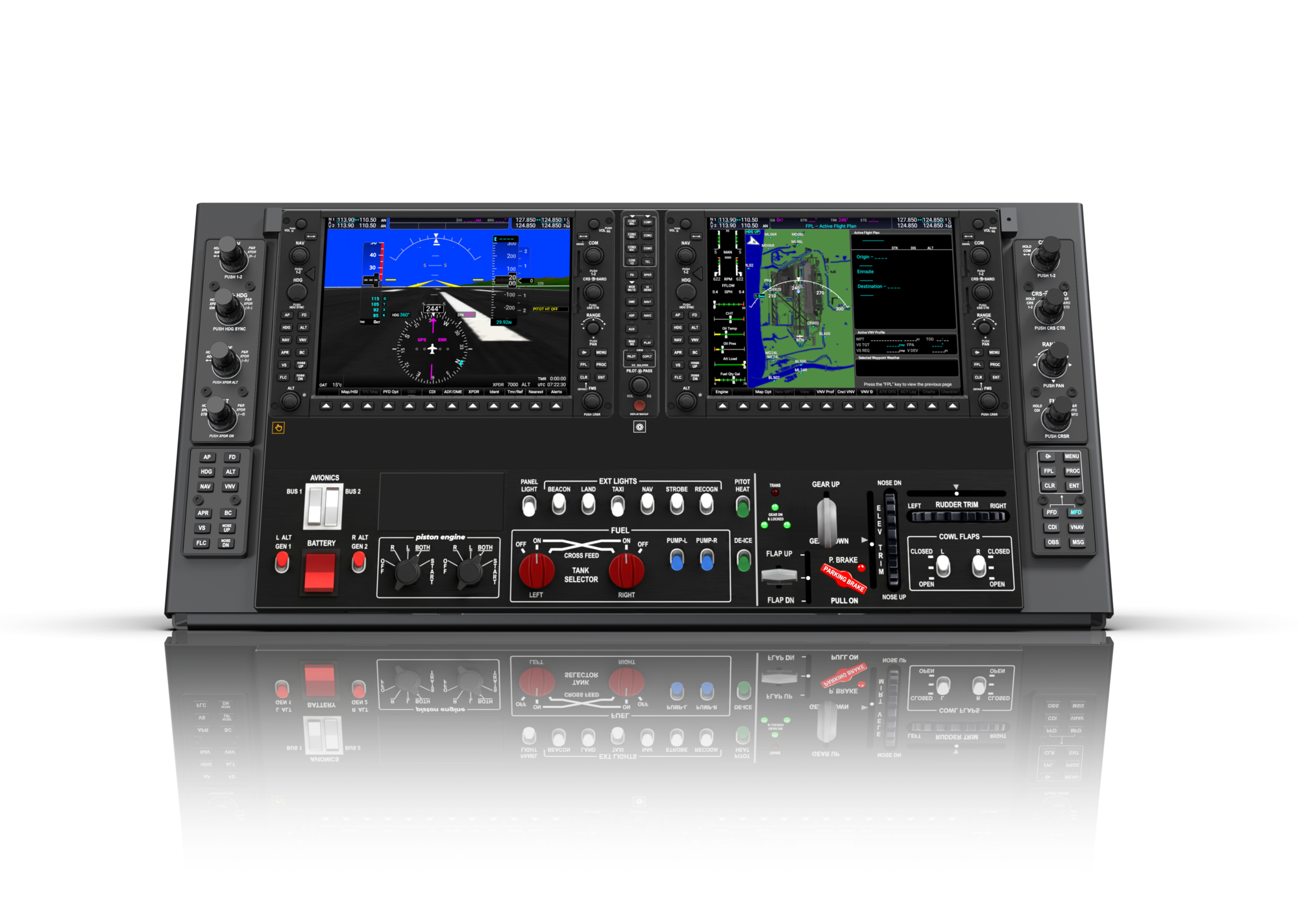
panelAIR is a complete cockpit panel for Microsoft Flight Simulator based on an 18.4″ 4K touchscreen and physical dual-axis rotary encoders, designed to operate G1000 avionics in General Aviation aircraft and the TBM 930 G3000, together with the main aircraft controls and systems needed throughout the entire flight, from cold & dark startup to complete VFR and IFR operations — plus pulsAIR (optional).
rotAIR, vertical front panels, pulsAIR (optional) and accessories are chosen at checkout. Use the to see the exact price for your order.
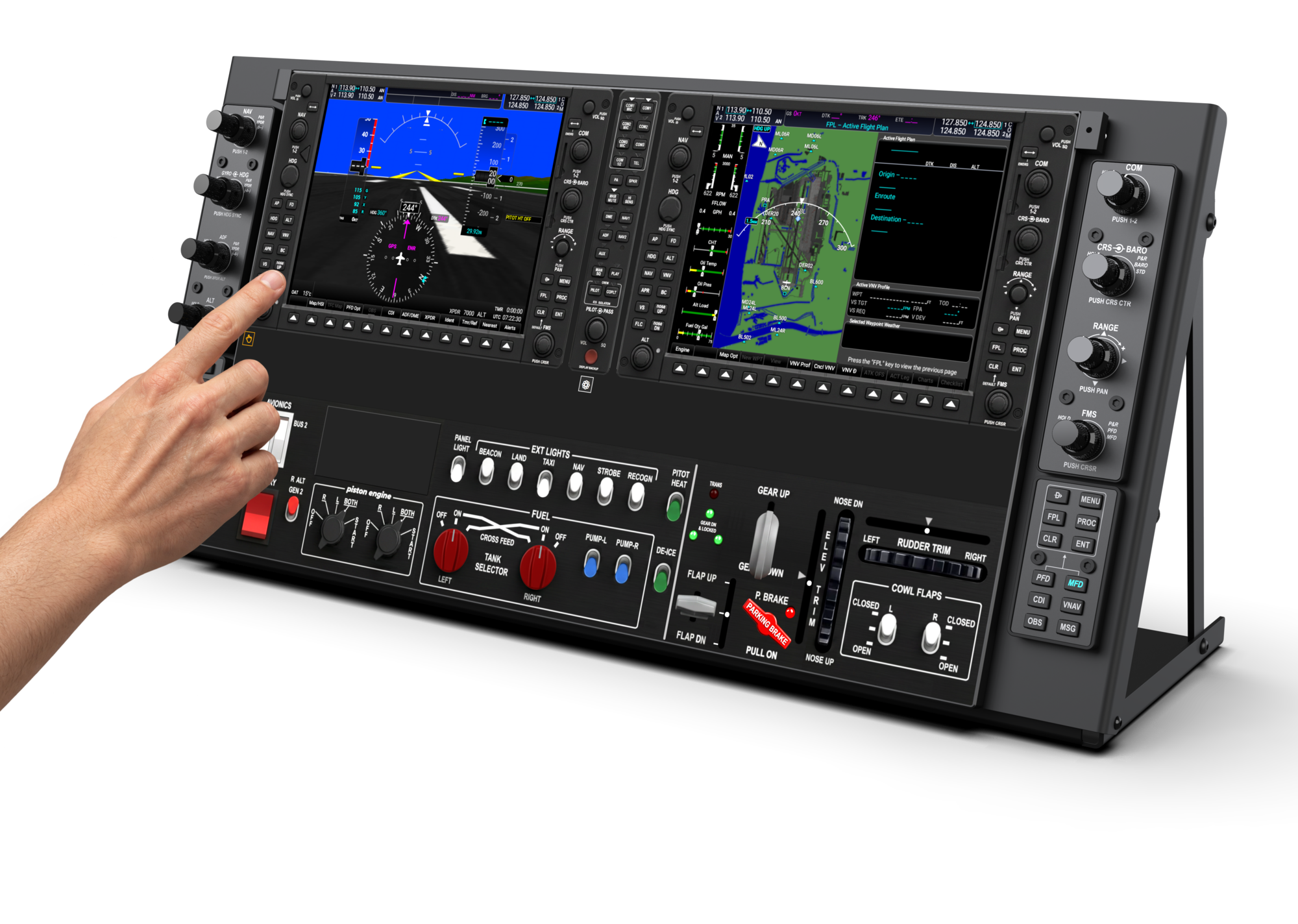
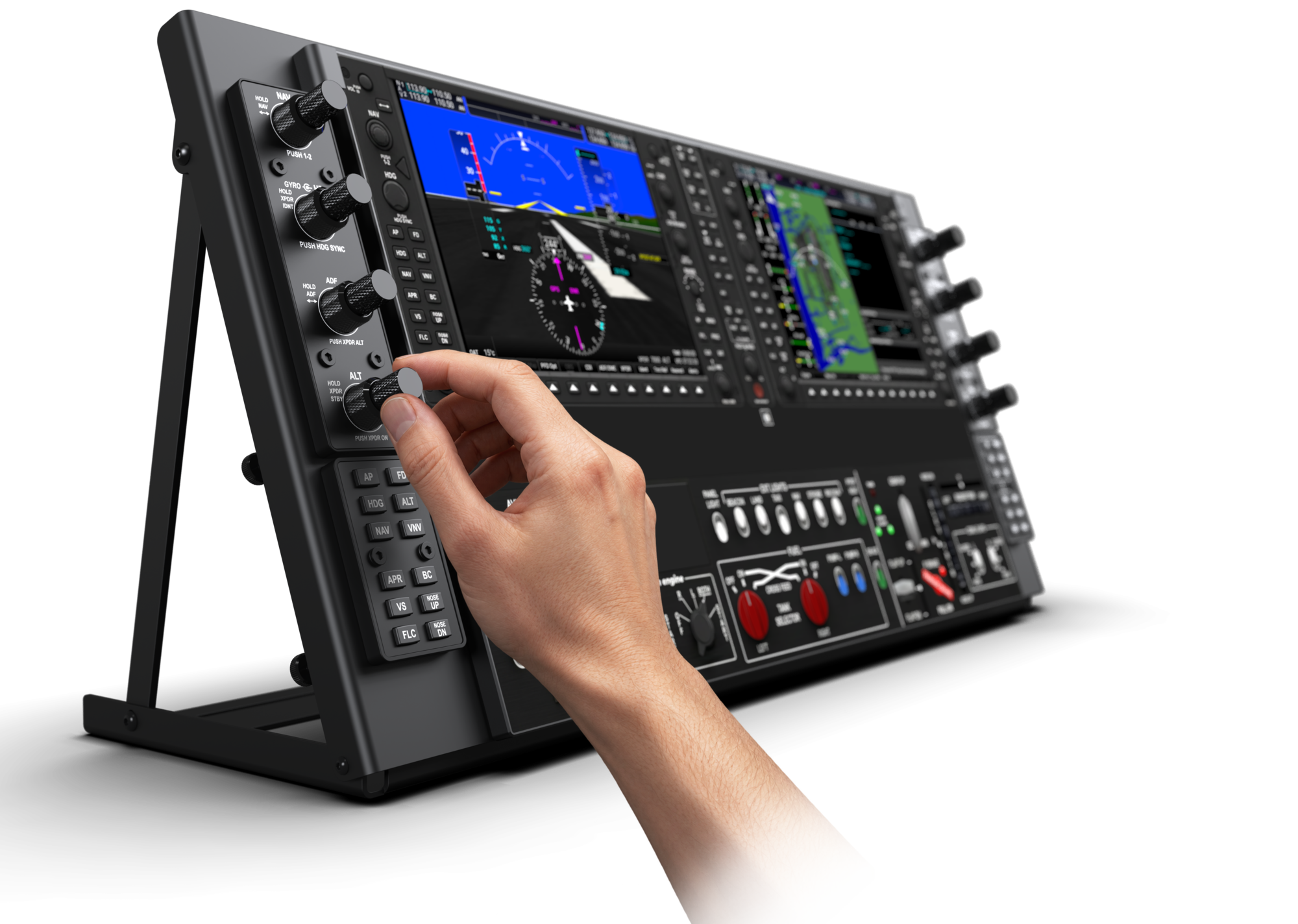
Dual Aluminum Rotary EncodersOptional: Physical Keypad
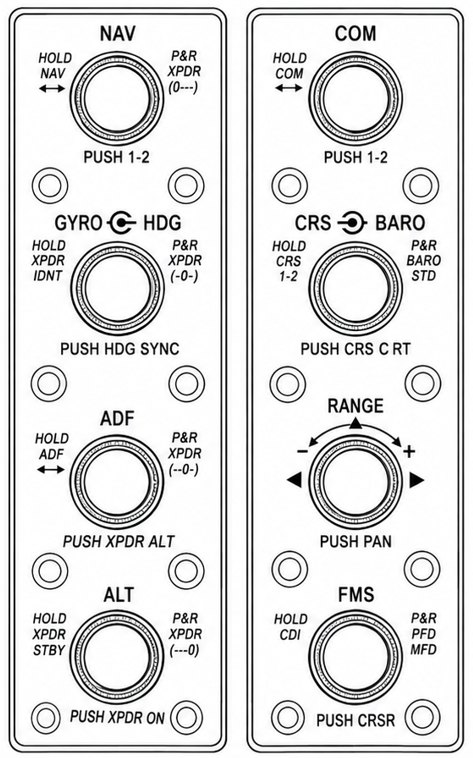
panelAIR is designed to be used together with rotAIR, two modules with a total of eight dual-axis aluminum encoders to tune and operate the avionics, the same way real pilots do. Backlighting included.
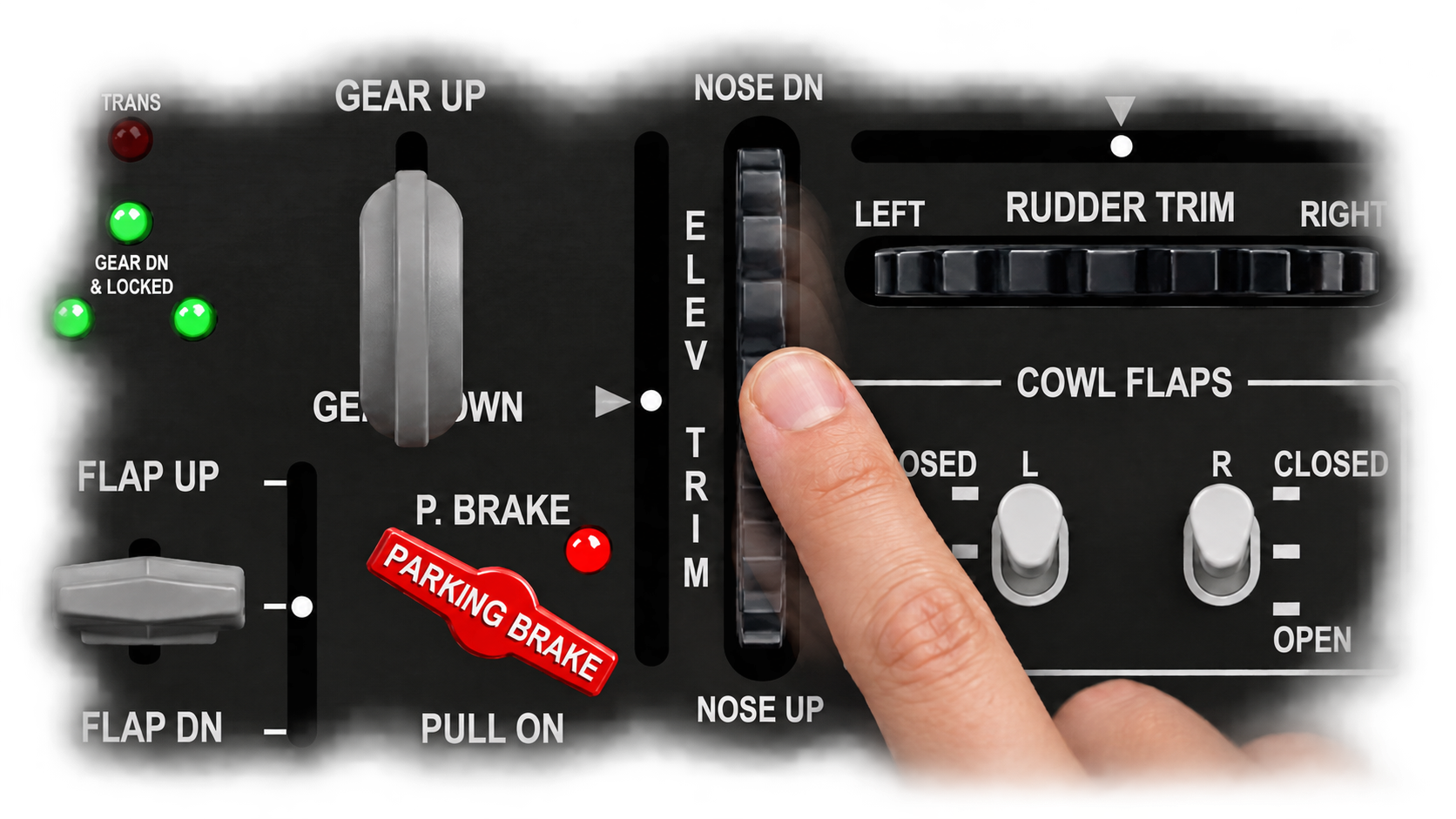
Trim Wheels That Move Like the Real Cockpit
Elevator and rudder trim wheels respond to a natural sliding gesture: just slide your finger to trim. When the autopilot operates the trim, the wheels move on screen exactly as they would in the real cockpit, so the aircraft’s actual trim position is always visible.
One G1000 Cockpit, Every Compatible Aircraft
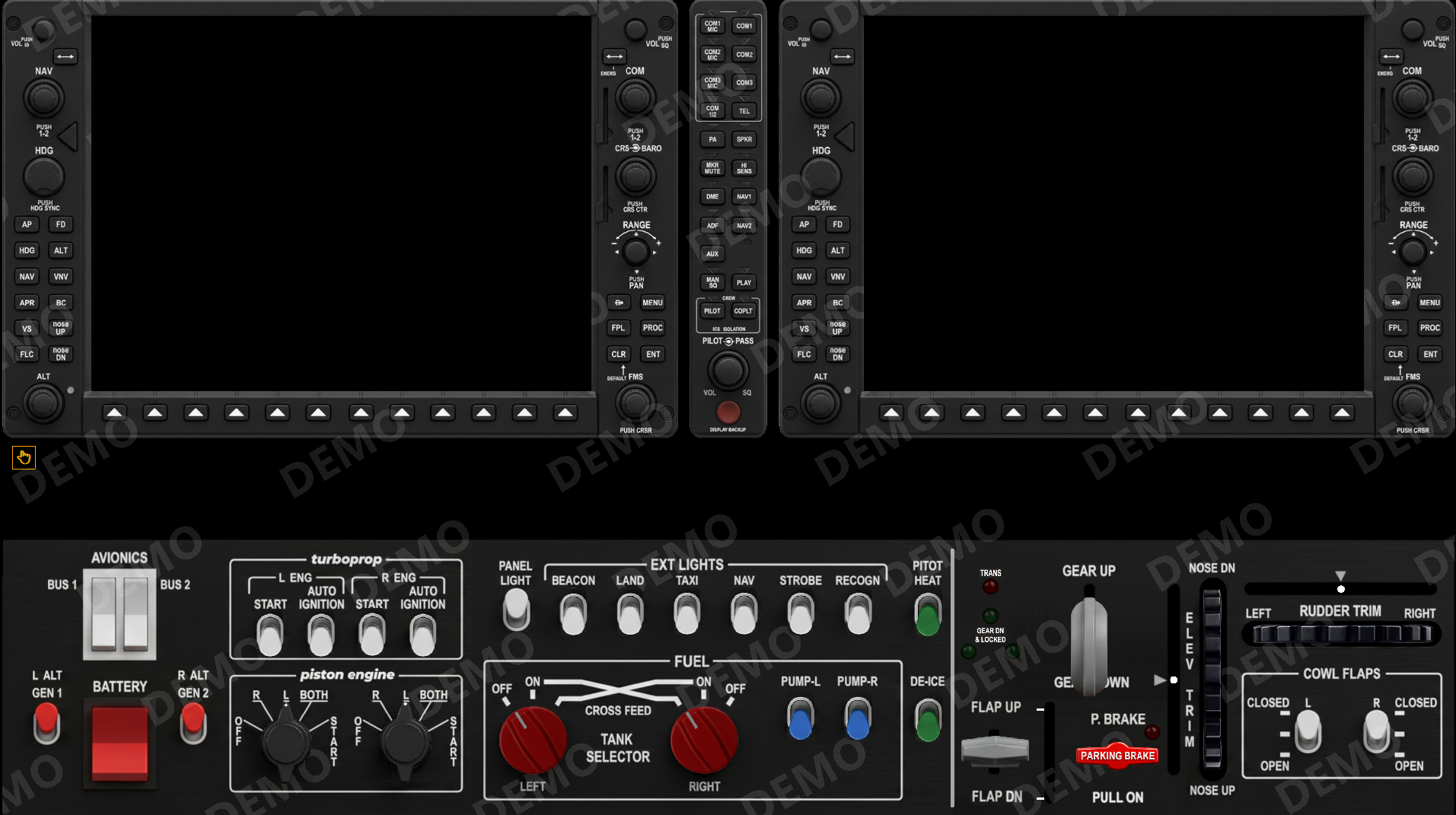
panelAIR reproduces the complete G1000 avionics suite and automatically adapts to every default G1000-equipped aircraft in Microsoft Flight Simulator, adjusting the cockpit layout for single or twin-engine, piston or turboprop configurations.
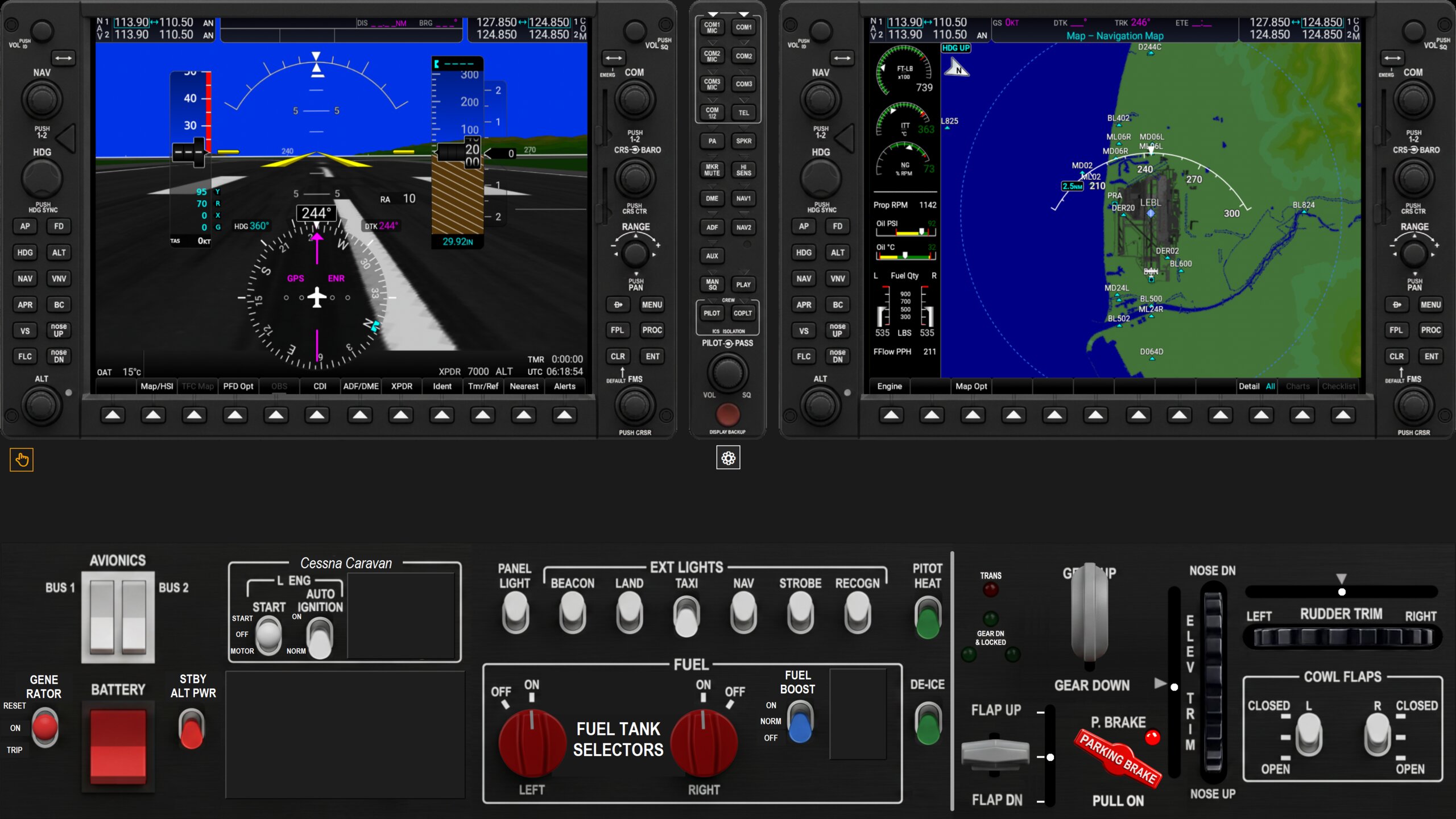
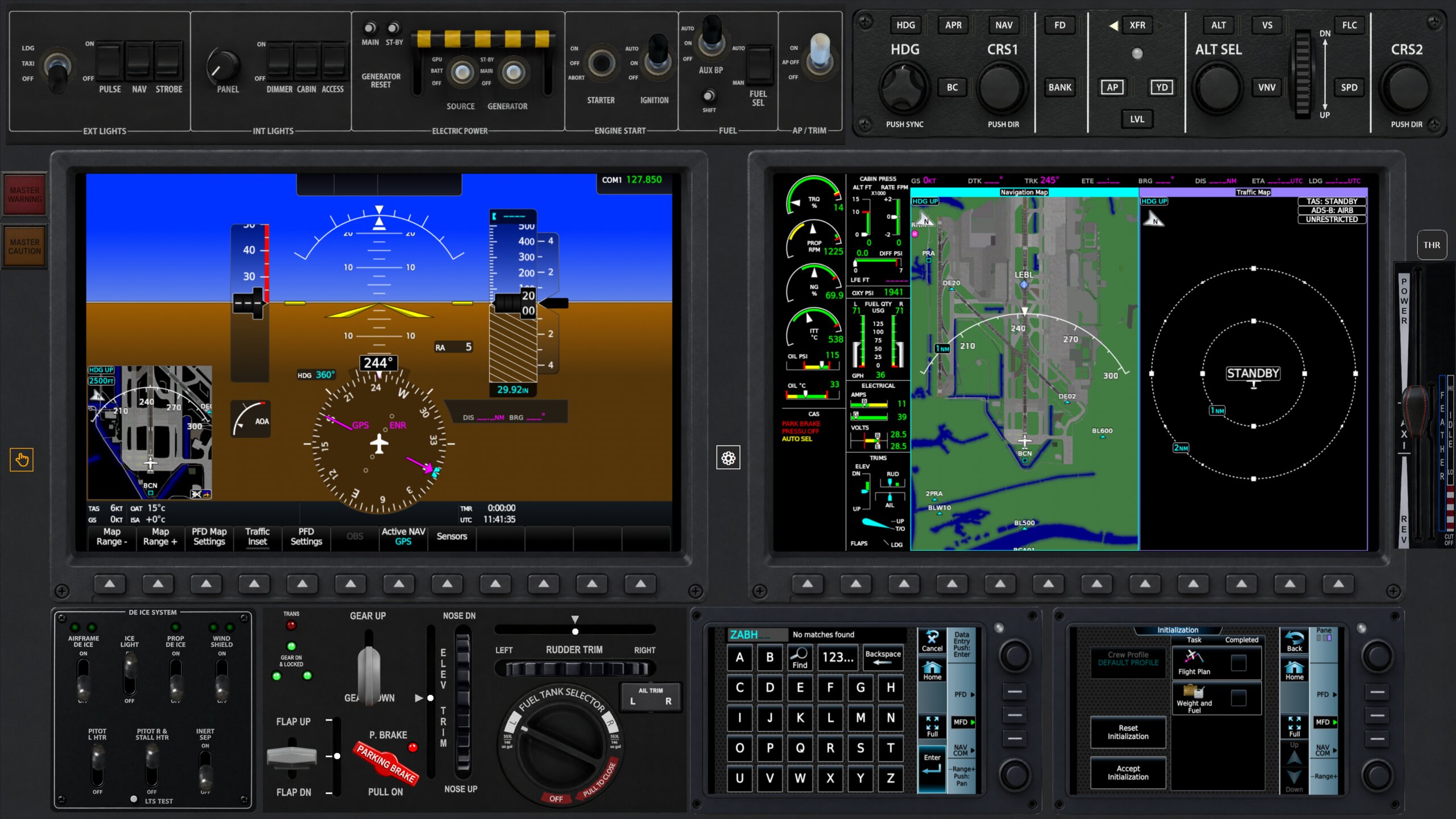
A Dedicated TBM 930 G3000 Cockpit
panelAIR automatically switches to a full TBM 930 cockpit: G3000 PFD & MFD side by side with a touch-operated TSC1 and TSC2, just like the real aircraft, plus a full overhead panel and autopilot panel replica, touch control of the TBM’s single H-gate power and condition lever, a manual/automatic fuel selector, a de-ice system replica, and master warning and master caution management.
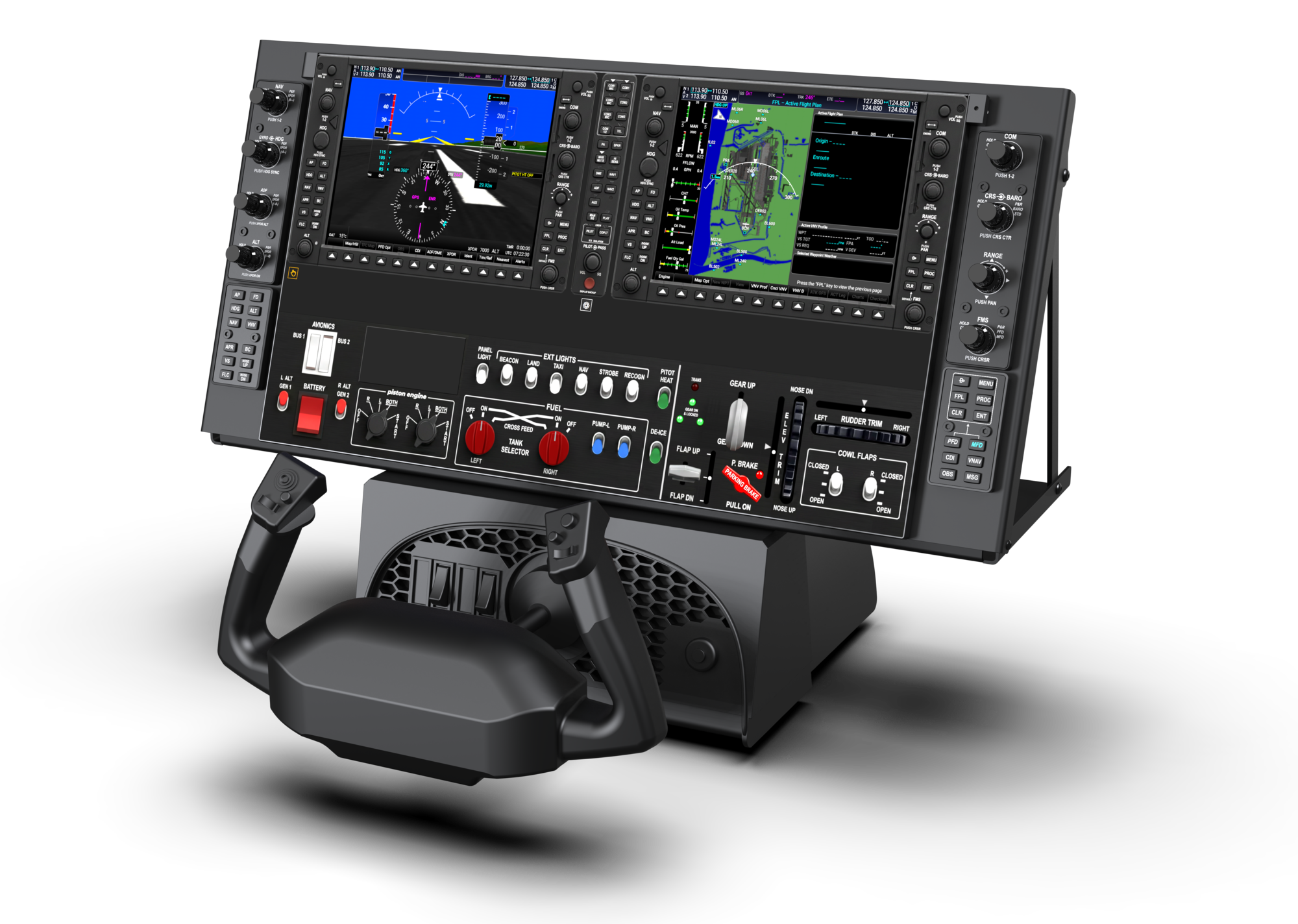
Mounts anywhere you fly
panelAIR sits securely on your desk by its own weight and anti-slip rubber feet, no clamps needed. The included yoke adaptation kit lets you mount it directly over yokes from VirtualFly, Saitek, Honeycomb and Moza. It is designed to keep panelAIR completely fixed in place, with no movement.
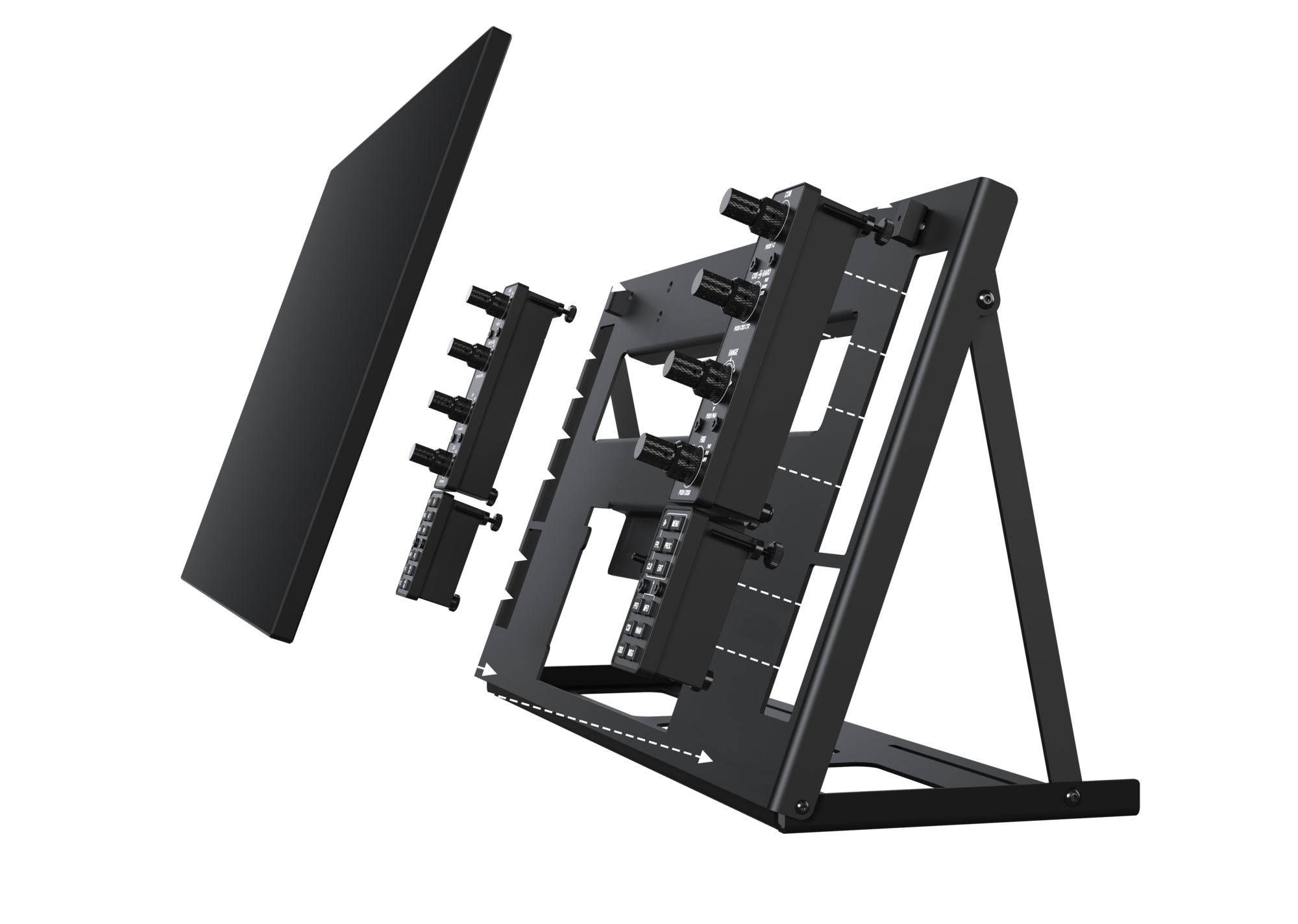
Four Precision Packages, Assembled by You
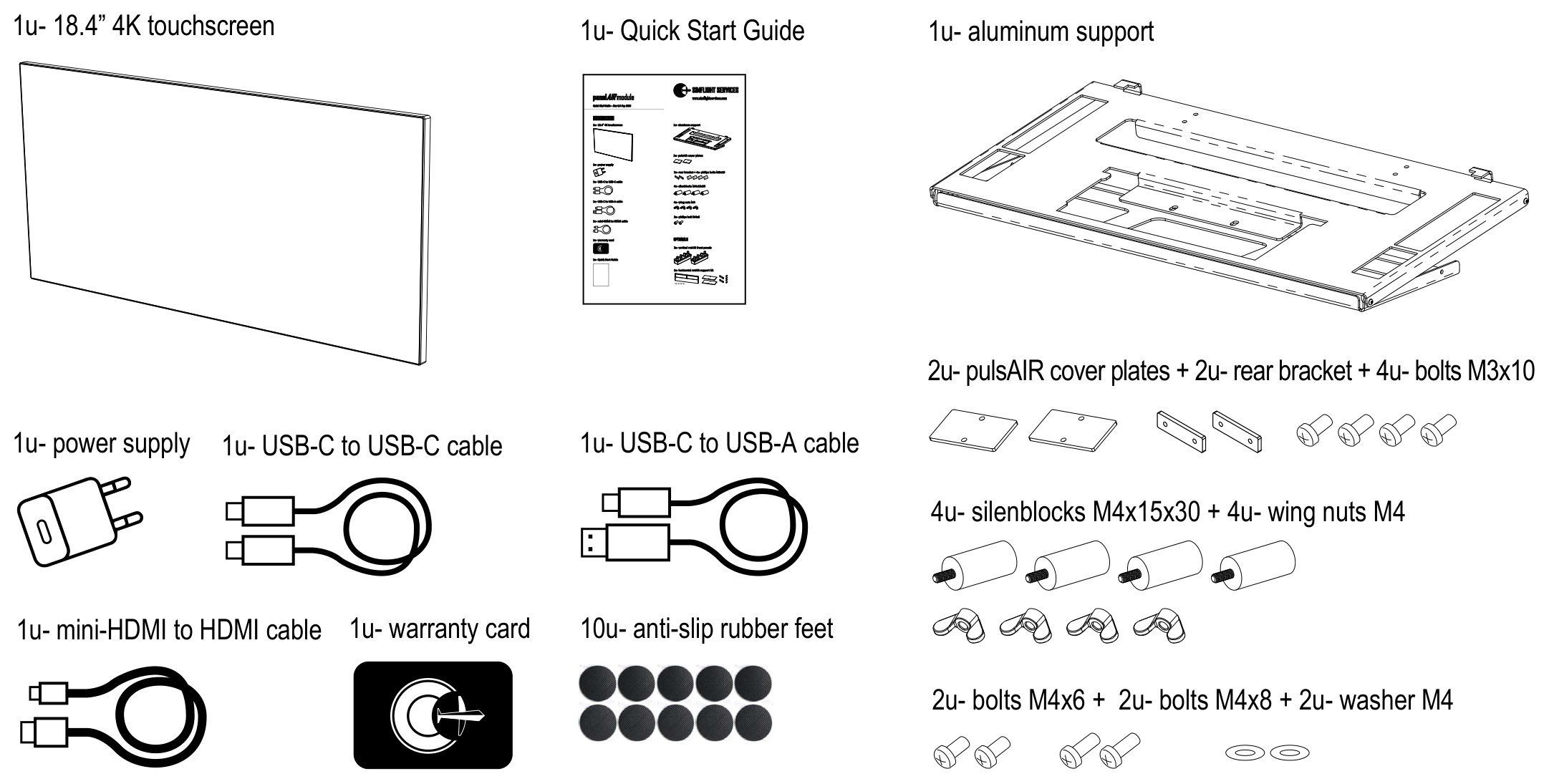
panelAIR arrives in a single shipment, with each component carefully packaged inside: the aluminum support, the 18.4″ touchscreen, rotAIR with its vertical front panels, and the optional pulsAIR keypad. You put them together yourself, guided step by step by the included Quick Start Guide — 30 to 45 minutes, no special tools required.
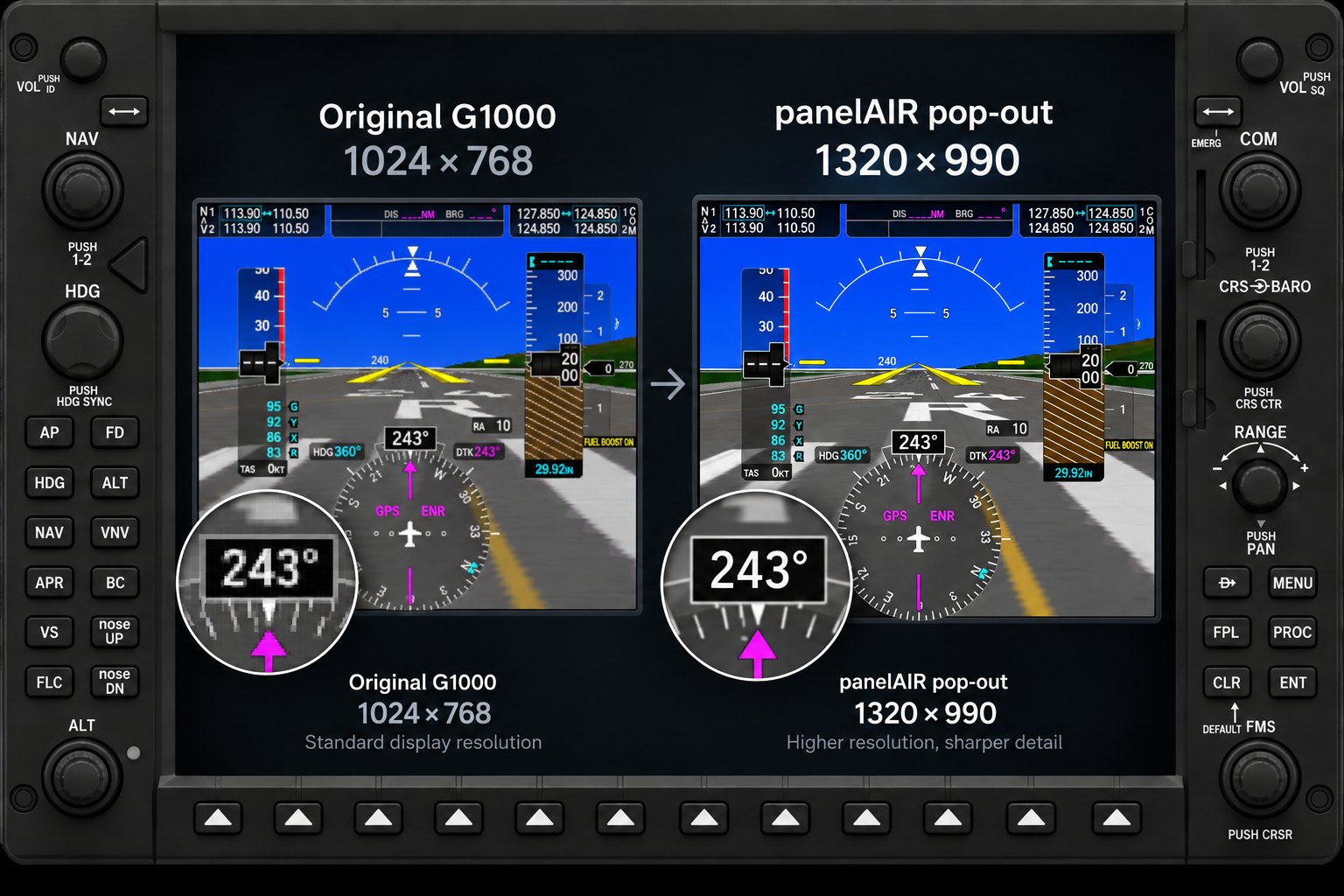
Higher Resolution Than the Real G1000 and G3000
panelAIR positions the G1000 and G3000 pop-outs at a higher resolution than the physical aircraft displays — 1320×990 for G1000 and 1590×990 for G3000 — for a sharper, more detailed avionics view.
Try it before you buy it
The panelAIR App is the software that shows all the avionics on the 4K touchscreen and runs on the same PC as Microsoft Flight Simulator.
If you do not have panelAIR yet, you can download the App for free. It works in a 10-minute DEMO mode, without a touchscreen, so you can try it with just a mouse. You can also use this demo mode to check compatibility with default aircraft (listed in our ) and with non-default aircraft not listed there.
When you buy panelAIR, the App changes automatically from DEMO to full mode, with unlimited use, as soon as it detects the panelAIR touchscreen and rotAIR.
A guided setup, step by step
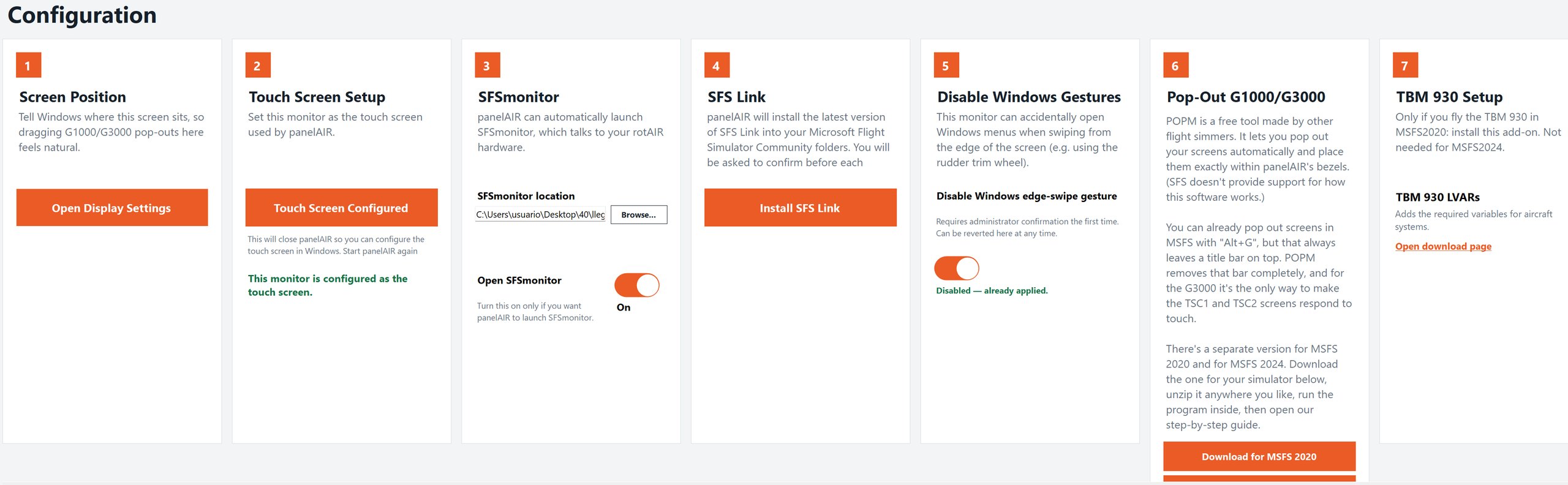
panelAIR walks you through the entire Windows and Microsoft Flight Simulator setup, right inside the app.
Aircraft & Systems Compatibility
panelAIR reproduces the real cockpit controls of each supported aircraft. The tables below show exactly what is implemented for every default Microsoft Flight Simulator G1000 aircraft, and for the TBM 930 with G3000.
Default MSFS Aircraft (G1000)
| System | Cessna 172 | DA40 NG | DA62 | Cirrus SR22T | Bonanza G36 | Baron G58 | Caravan C208B | Cessna 400 Corvalis | Cessna 408 Sky Courier | |||||||||||||||||||||||||||||||||||||||||||||||||||||||||||||||||||||||||||||||||||||||||
|---|---|---|---|---|---|---|---|---|---|---|---|---|---|---|---|---|---|---|---|---|---|---|---|---|---|---|---|---|---|---|---|---|---|---|---|---|---|---|---|---|---|---|---|---|---|---|---|---|---|---|---|---|---|---|---|---|---|---|---|---|---|---|---|---|---|---|---|---|---|---|---|---|---|---|---|---|---|---|---|---|---|---|---|---|---|---|---|---|---|---|---|---|---|---|---|---|---|---|
| 2020 | 2024 | 2020 | 2024 | 2020 | 2024 | 2020 | 2024 | 2020 | 2024 | 2020 | 2024 | 2020 | 2024 | 2024 | 2024 | |||||||||||||||||||||||||||||||||||||||||||||||||||||||||||||||||||||||||||||||||||
| AVIONICS | ||||||||||||||||||||||||||||||||||||||||||||||||||||||||||||||||||||||||||||||||||||||||||||||||||
| G1000 PFD | V | V | V | V | V | V | V | V | V | V | V | V | V | V | V | V | ||||||||||||||||||||||||||||||||||||||||||||||||||||||||||||||||||||||||||||||||||
| G1000 MFD | V | V | V | V | V | V | V | V | V | V | V | V | V | V | V | V | ||||||||||||||||||||||||||||||||||||||||||||||||||||||||||||||||||||||||||||||||||
| G1000 Audio Panel | V | V | V | V | V | V | V | V | V | V | V | V | V | V | V | V | ||||||||||||||||||||||||||||||||||||||||||||||||||||||||||||||||||||||||||||||||||
| ELECTRICAL | ||||||||||||||||||||||||||||||||||||||||||||||||||||||||||||||||||||||||||||||||||||||||||||||||||
| Master Battery | V | V | V | V | V | V | V | V | V | V | V | V | V | V | V | V | ||||||||||||||||||||||||||||||||||||||||||||||||||||||||||||||||||||||||||||||||||
| Master Avionics | V | V | V | V | V | V | V | V | V | V | V | V | V | V | V | V4 | ||||||||||||||||||||||||||||||||||||||||||||||||||||||||||||||||||||||||||||||||||
| Generator / Alternator / Essential Bus | – | – | – | – | V | V | V | V | V | V | V | V | P3 | P3 | V | V | ||||||||||||||||||||||||||||||||||||||||||||||||||||||||||||||||||||||||||||||||||
| Essential Bus (ALT-GEN2) | – | – | V2 | V2 | – | – | – | – | – | – | – | – | – | – | – | – | ||||||||||||||||||||||||||||||||||||||||||||||||||||||||||||||||||||||||||||||||||
| ENGINE | ||||||||||||||||||||||||||||||||||||||||||||||||||||||||||||||||||||||||||||||||||||||||||||||||||
| Engine Start | V | V | V | V | V | V | V | V | V | V | V | V | V | V | V | V | ||||||||||||||||||||||||||||||||||||||||||||||||||||||||||||||||||||||||||||||||||
| Engine Auto-Ignition [turboprops] | – | – | – | – | – | – | – | – | – | – | – | – | X9 | X9 | – | V | ||||||||||||||||||||||||||||||||||||||||||||||||||||||||||||||||||||||||||||||||||
| LIGHTS | ||||||||||||||||||||||||||||||||||||||||||||||||||||||||||||||||||||||||||||||||||||||||||||||||||
| External Lights | V | V | V | V | V | V | V | V | V | V | V | V | V | V | V | V5 | ||||||||||||||||||||||||||||||||||||||||||||||||||||||||||||||||||||||||||||||||||
| FUEL | ||||||||||||||||||||||||||||||||||||||||||||||||||||||||||||||||||||||||||||||||||||||||||||||||||
| Fuel Tank Selector | V | V | – | V | V | V | V | V | V | V | V | V | V | V | V | V | ||||||||||||||||||||||||||||||||||||||||||||||||||||||||||||||||||||||||||||||||||
| Fuel Pumps & Transfer | V | – | V | V | V | V | V | V | V | V | V7 | V | V | V | V | V | ||||||||||||||||||||||||||||||||||||||||||||||||||||||||||||||||||||||||||||||||||
| ICE PROTECTION | ||||||||||||||||||||||||||||||||||||||||||||||||||||||||||||||||||||||||||||||||||||||||||||||||||
| Pitot Heat | V | V | V | V | V | V | V | V | V | V | V | V | V | V | V | V | ||||||||||||||||||||||||||||||||||||||||||||||||||||||||||||||||||||||||||||||||||
| De-ice Airframe | – | – | – | – | – | – | V | V | – | – | V | V | V | – | V | V | ||||||||||||||||||||||||||||||||||||||||||||||||||||||||||||||||||||||||||||||||||
| De-ice Propeller | – | – | – | – | – | – | – | – | V | V | – | – | – | – | – | – | ||||||||||||||||||||||||||||||||||||||||||||||||||||||||||||||||||||||||||||||||||
| De-ice Windshield | – | – | – | – | – | – | – | – | – | – | – | – | – | – | – | – | ||||||||||||||||||||||||||||||||||||||||||||||||||||||||||||||||||||||||||||||||||
| FLIGHT CONTROLS / GEAR | ||||||||||||||||||||||||||||||||||||||||||||||||||||||||||||||||||||||||||||||||||||||||||||||||||
| Landing Gear | – | – | – | – | V | V | – | – | V | V | V | V | – | – | – | – | ||||||||||||||||||||||||||||||||||||||||||||||||||||||||||||||||||||||||||||||||||
| Flaps | V | V | V | V | V | V | V | V | V | V | V | V | V | V | V | V | ||||||||||||||||||||||||||||||||||||||||||||||||||||||||||||||||||||||||||||||||||
| Parking Brake | V | V | V | V | V | V | V | V | V | V | V | V | V | V | V | V | ||||||||||||||||||||||||||||||||||||||||||||||||||||||||||||||||||||||||||||||||||
| Elevator Trim | V | V | V | V | V | V | V | V | V | V | V | V | V | V | V | V | ||||||||||||||||||||||||||||||||||||||||||||||||||||||||||||||||||||||||||||||||||
| Rudder Trim | – | – | – | – | V | V | – | – | – | – | V | V | V | V | – | V | ||||||||||||||||||||||||||||||||||||||||||||||||||||||||||||||||||||||||||||||||||
| Cowl Flaps | – | – | – | – | – | – | – | – | V | V | V | V | – | – | – | – | ||||||||||||||||||||||||||||||||||||||||||||||||||||||||||||||||||||||||||||||||||
| Aileron Trim | – | – | – | – | – | – | X | X | X | X | X | X | – | – | – | – | ||||||||||||||||||||||||||||||||||||||||||||||||||||||||||||||||||||||||||||||||||
TBM 930 (G3000)
| System | TBM 930 G3000 | |||||||||||||||||||||||||||||||||||||||||||||||||||||||||||||||||||||||||||||||||||||||||||||||||
|---|---|---|---|---|---|---|---|---|---|---|---|---|---|---|---|---|---|---|---|---|---|---|---|---|---|---|---|---|---|---|---|---|---|---|---|---|---|---|---|---|---|---|---|---|---|---|---|---|---|---|---|---|---|---|---|---|---|---|---|---|---|---|---|---|---|---|---|---|---|---|---|---|---|---|---|---|---|---|---|---|---|---|---|---|---|---|---|---|---|---|---|---|---|---|---|---|---|---|
| 2020 | 2024 | |||||||||||||||||||||||||||||||||||||||||||||||||||||||||||||||||||||||||||||||||||||||||||||||||
| AVIONICS | ||||||||||||||||||||||||||||||||||||||||||||||||||||||||||||||||||||||||||||||||||||||||||||||||||
| G3000 PFD | V | V | ||||||||||||||||||||||||||||||||||||||||||||||||||||||||||||||||||||||||||||||||||||||||||||||||
| G3000 MFD | V | V | ||||||||||||||||||||||||||||||||||||||||||||||||||||||||||||||||||||||||||||||||||||||||||||||||
| Touch Screen Control 1 | V | V | ||||||||||||||||||||||||||||||||||||||||||||||||||||||||||||||||||||||||||||||||||||||||||||||||
| Touch Screen Control 2 | V8 | V8 | ||||||||||||||||||||||||||||||||||||||||||||||||||||||||||||||||||||||||||||||||||||||||||||||||
| Autopilot (GFC 710) | V | V | ||||||||||||||||||||||||||||||||||||||||||||||||||||||||||||||||||||||||||||||||||||||||||||||||
| Master Warning | V | V | ||||||||||||||||||||||||||||||||||||||||||||||||||||||||||||||||||||||||||||||||||||||||||||||||
| Master Caution | V | V | ||||||||||||||||||||||||||||||||||||||||||||||||||||||||||||||||||||||||||||||||||||||||||||||||
| ELECTRICAL | ||||||||||||||||||||||||||||||||||||||||||||||||||||||||||||||||||||||||||||||||||||||||||||||||||
| Source Switch (Batt/GPU) | V | V | ||||||||||||||||||||||||||||||||||||||||||||||||||||||||||||||||||||||||||||||||||||||||||||||||
| Generator Switch (Off/Main/Stby) | V | V | ||||||||||||||||||||||||||||||||||||||||||||||||||||||||||||||||||||||||||||||||||||||||||||||||
| Crashbar | V | V | ||||||||||||||||||||||||||||||||||||||||||||||||||||||||||||||||||||||||||||||||||||||||||||||||
| ENGINE | ||||||||||||||||||||||||||||||||||||||||||||||||||||||||||||||||||||||||||||||||||||||||||||||||||
| Engine Start | V1 | V1 | ||||||||||||||||||||||||||||||||||||||||||||||||||||||||||||||||||||||||||||||||||||||||||||||||
| Engine Auto-Ignition | V | V | ||||||||||||||||||||||||||||||||||||||||||||||||||||||||||||||||||||||||||||||||||||||||||||||||
| LIGHTS | ||||||||||||||||||||||||||||||||||||||||||||||||||||||||||||||||||||||||||||||||||||||||||||||||||
| External Lights | V | V | ||||||||||||||||||||||||||||||||||||||||||||||||||||||||||||||||||||||||||||||||||||||||||||||||
| Pulse Light | V | V | ||||||||||||||||||||||||||||||||||||||||||||||||||||||||||||||||||||||||||||||||||||||||||||||||
| FUEL | ||||||||||||||||||||||||||||||||||||||||||||||||||||||||||||||||||||||||||||||||||||||||||||||||||
| Fuel Tank Selector | V | V | ||||||||||||||||||||||||||||||||||||||||||||||||||||||||||||||||||||||||||||||||||||||||||||||||
| Fuel Pumps & Transfer | V | V | ||||||||||||||||||||||||||||||||||||||||||||||||||||||||||||||||||||||||||||||||||||||||||||||||
| ICE PROTECTION | ||||||||||||||||||||||||||||||||||||||||||||||||||||||||||||||||||||||||||||||||||||||||||||||||||
| Pitot Heat | V6 | V6 | ||||||||||||||||||||||||||||||||||||||||||||||||||||||||||||||||||||||||||||||||||||||||||||||||
| De-ice Airframe | V | V | ||||||||||||||||||||||||||||||||||||||||||||||||||||||||||||||||||||||||||||||||||||||||||||||||
| De-ice Propeller | V2 | V | ||||||||||||||||||||||||||||||||||||||||||||||||||||||||||||||||||||||||||||||||||||||||||||||||
| De-ice Windshield | V | V | ||||||||||||||||||||||||||||||||||||||||||||||||||||||||||||||||||||||||||||||||||||||||||||||||
| Ice Light | V | V | ||||||||||||||||||||||||||||||||||||||||||||||||||||||||||||||||||||||||||||||||||||||||||||||||
| De-ice Inert Separator | V2 | V | ||||||||||||||||||||||||||||||||||||||||||||||||||||||||||||||||||||||||||||||||||||||||||||||||
| FLIGHT CONTROLS / GEAR | ||||||||||||||||||||||||||||||||||||||||||||||||||||||||||||||||||||||||||||||||||||||||||||||||||
| Landing Gear | V | V | ||||||||||||||||||||||||||||||||||||||||||||||||||||||||||||||||||||||||||||||||||||||||||||||||
| Flaps | V | V | ||||||||||||||||||||||||||||||||||||||||||||||||||||||||||||||||||||||||||||||||||||||||||||||||
| Parking Brake | V | V | ||||||||||||||||||||||||||||||||||||||||||||||||||||||||||||||||||||||||||||||||||||||||||||||||
| Elevator Trim | V | V | ||||||||||||||||||||||||||||||||||||||||||||||||||||||||||||||||||||||||||||||||||||||||||||||||
| Rudder Trim | V | V | ||||||||||||||||||||||||||||||||||||||||||||||||||||||||||||||||||||||||||||||||||||||||||||||||
| Aileron Trim | V | V | ||||||||||||||||||||||||||||||||||||||||||||||||||||||||||||||||||||||||||||||||||||||||||||||||
| Throttle Q. (Taxi/Hi Idle/Low Idle) | V | V | ||||||||||||||||||||||||||||||||||||||||||||||||||||||||||||||||||||||||||||||||||||||||||||||||
Frequently Asked Questions
What is panelAIR?
panelAIR is a complete touchscreen cockpit panel for Microsoft Flight Simulator. It combines an 18.4″ 4K touchscreen, an aluminum desktop support and the panelAIR App to reproduce not only the G1000 or G3000 avionics, but also the essential aircraft instrumentation and controls required to operate the supported GA aircraft and the TBM 930, from cold & dark startup through a complete flight.
Where do I connect panelAIR, and what runs what I see on its screen?
panelAIR connects directly to the same Windows PC that already runs Microsoft Flight Simulator, using one HDMI or DisplayPort cable for video and a USB connection for touch and rotAIR. panelAIR has no computer of its own: the panelAIR App, running on your PC, generates the entire G1000 or G3000 avionics suite you see on the touchscreen, and places the Microsoft Flight Simulator pop-outs inside the instrument bezels.
Can panelAIR be used without rotAIR?
No. Unlimited use is enabled only when the panelAIR App detects both the panelAIR touchscreen and rotAIR. If rotAIR is not detected, the app runs for only 10 minutes and then closes automatically. rotAIR is also required to operate the rotary avionics controls.
Is rotAIR included with panelAIR?
rotAIR is required to use panelAIR. Unless you already own it, you’ll need to add it to your order, and it will arrive together with the support and the touchscreen in the same shipment, along with its vertical front panels.
Is pulsAIR included?
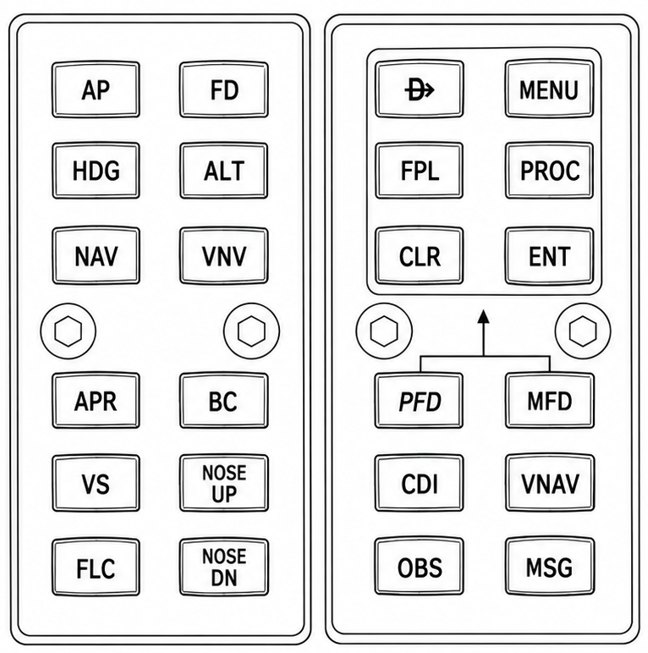
No, pulsAIR is optional and sold separately. It adds physical push buttons for greater realism, but panelAIR can be used without it. If you add it to your order, it arrives together with the rest of panelAIR in the same shipment.
Why do I see physical knobs and buttons at the sides, and the same ones on the screen?
The physical buttons are the pulsAIR (two modules with 12 keys each), which is recommended but optional. If you do not have it, you can use the buttons on the screen with a touch.
The knobs on the screen are only there to keep the look of the real G1000 bezel, but they are not functional. The real rotary controls are the rotAIR encoders.
Does panelAIR include the G1000 NXi or G3000 avionics software?
No. panelAIR does not include the G1000 NXi or G3000 avionics software. These displays are generated by Microsoft Flight Simulator and must be moved from the virtual cockpit to the panelAIR screen.
How do I move the PFD and MFD from MSFS to panelAIR?
There are three ways to pop out the PFD and MFD from MSFS onto panelAIR:
- MSFS’s native pop-out feature, triggered with the right AltGr key and a click on the display inside the virtual cockpit.
⚠ On the TBM 930, the TSC1 and TSC2 displays are touchscreens. The AltGr method above doesn’t preserve touch control, so for these displays we recommend options 2 and 3 below instead.
- MSFS Pop Out Panel Manager, which automates this, restores the layout automatically, and preserves touch control on the TBM 930’s TSC1 and TSC2 displays.
- GlassOut, a third-party app that streams MSFS cockpit displays to any screen, including panelAIR, while preserving touch control.
The panelAIR App wizard includes a step by step guide to do this with MSFS Pop Out Panel Manager.
These are tools from MSFS and third parties, so SimFlight Services does not provide technical support for them.
At what resolution are the PFD and MFD pop-outs shown on panelAIR?
The G1000 pop-outs are positioned at 1320×990 px on panelAIR, compared with 1024×768 px on the real G1000 display. The G3000 pop-out is positioned at 1590×990 px, compared with 1280×800 px on the real G3000 display. The TSC1 and TSC2 pop-outs are positioned at 720×440 px. See the for the full technical details.
Can I install pulsAIR later?
Yes. pulsAIR can be added later without replacing the panelAIR support or any other component. Cover plates are included to close the pulsAIR openings when the modules are not installed.
Which simulators are supported?
panelAIR is designed for Microsoft Flight Simulator 2020 and Microsoft Flight Simulator 2024.
Which avionics systems are supported?
The app supports G1000 avionics in any default G1000-equipped aircraft in Microsoft Flight Simulator, and the G3000 system in the default TBM 930. The complete aircraft list is available in the .
Does panelAIR support third-party aircraft?
panelAIR supports only the listed default MSFS aircraft. However, you can download the demo and check the compatibility yourself, since many third-party aircraft may still work well with panelAIR. We do not provide support or custom compatibility for third-party aircraft.
Is panelAIR compatible with X-Plane or other simulators?
panelAIR is made for Microsoft Flight Simulator 2020 and 2024. Other simulators are not supported.
Does the app detect the aircraft automatically?
Yes. panelAIR automatically detects the loaded aircraft and switches between the G1000 cockpit and the TBM 930 cockpit on its own, with no action needed from you. Within the G1000 cockpit, the layout also automatically adapts to the supported GA aircraft configuration.
Can I use the panelAIR app with another monitor?
Yes, for evaluation. The panelAIR app can run for 10 minutes on another monitor. It natively runs at 3840×2160, but since the demo is windowed, it can adapt to any resolution. Unlimited use requires both the panelAIR touchscreen and rotAIR hardware.
Can the app be operated with a mouse?
Yes. The interface can be operated with a mouse, which is also necessary during initial setup if Windows has not yet assigned touch input to the panelAIR screen.
Can I move or resize the instruments?
No. In the full, unlimited version running on the panelAIR touchscreen, the interface has a fixed layout specifically designed for 3840×2160 resolution and cannot be resized.
Do I need to install anything inside MSFS?
Yes. Our SFS-Link must be installed in the Community folder. The panelAIR App includes an automatic installer for this.
Does panelAIR require SFSmonitor?
Yes. SFSmonitor manages and detects the rotAIR and optional pulsAIR hardware. The panelAIR App can be configured to launch and close SFSmonitor automatically.
How is panelAIR installed and assembled?
panelAIR arrives in a single shipment, with the touchscreen, the support, and rotAIR with its vertical front panels (if you didn’t already have it) carefully packaged together. The included Quick Start Guide explains how to assemble the support, attach the screen, install rotAIR and the optional pulsAIR, fit the cover plates when pulsAIR is not installed, and connect the video, power and USB cables — it takes 30 to 45 minutes in total. After that, the panelAIR App guides you through touchscreen configuration, automatic SFS-Link installation and optional automatic startup and shutdown of SFSmonitor.
Can I mount panelAIR on top of my yoke?
Yes. The yoke adaptation kit is included with every panelAIR. Its adjustable lower supports press against the sides of the yoke, which keeps panelAIR completely fixed in place, with no movement. It is ideal for yokes from VirtualFly, Saitek, Honeycomb and Moza, because their sides, or part of them, are completely vertical and their top is flat.
Which power-plug adapters are included?
The power supply includes EU, UK, USA and AU plug adapters.
Will the panelAIR App cause frame rate drops in MSFS?
No. The app is very well optimized to avoid frame drops. However, you may notice a small, short drop just when you touch the screen with your finger.
Specifications
Downloads
Build your setup
Tell us what you already have and see your real total, no surprises at checkout.